ITF-14 Barcodes
Carton/Case barcodes (GTIN-14) for logistics, master cartons, and distribution. With Standard plans, you buy once with no renewals.
Use our tools to buy GTINs, generate barcode images, and manage product data.
Carton/Case barcodes (GTIN-14) for logistics, master cartons, and distribution. With Standard plans, you buy once with no renewals.
Use our tools to buy GTINs, generate barcode images, and manage product data.
ITF-14 is the standard barcode format for marking cartons and shipping cases. It encodes a GTIN-14 derived from your product’s GTIN (UPC/EAN) and is used for logistics, warehousing, and distribution—not point-of-sale scanning.
Apply ITF-14 to outer packaging for inventory, receiving, and shipping. It is optimized for printing on corrugated materials.
Each ITF-14 encodes a GTIN-14 built from the same base GTIN used by your product’s UPC/EAN, with an indicator digit added for a specific case or grouping.
With Standard plans, you buy once with no annual fees. Use our generator to produce ITF-14 images (SVG/PNG) ready for print and labeling.
Yes, but only within clear GS1 rules. A single base GTIN can be expanded into multiple GTIN-14 case codes for standard pack configurations, but it is not unlimited.
Using indicator digits 1 through 8, one base GTIN can support up to eight distinct fixed pack or case identifiers in GTIN-14 format.
That direct GTIN-14 expansion is meant for uniform groupings: the carton contains the same product, in a defined quantity, every time.
If a case contains different item types or SKUs, treat that assortment as its own trade item. Assign a separate GTIN to that mixed pack, then encode it in ITF-14 if needed.
If you have already used the available direct grouping numbers, or the pack definition changes into a different trade item, assign a new GTIN for that packaging configuration.
Simple rule: same product and fixed count can usually stay under one base GTIN’s ITF-14 family; mixed contents or a new defined pack should get a new GTIN.
Each product variation (such as size, color, etc.) must have its own unique barcode. Imagine you're producing a sports t-shirt in three sizes and two colors. Sizes – S, M, L. Colors – Red, Blue. In this case, you'll need 6 separate barcodes so that each variation has its own unique code.
All barcodes are available in SVG and PNG formats. We provide EAN-13 barcodes starting with 0, delivered in a list along with high-quality images in both vector and print-ready versions, which you can print on your product or use online.
Buy Barcodes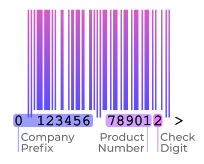
An ITF-14 encodes a 14-digit GTIN-14 built from these parts:
Typically 1–8 for standard fixed groupings, with 9 reserved for variable measure cases. The indicator digit does not have a universal meaning by itself; it identifies a specific grouping you assign.
Derived from the product’s base GTIN (UPC/EAN). Identifies the brand owner and the item being cased.
Calculated using the standard GTIN modulo-10 algorithm to validate correct scans.
You can generate ITF-14 images (SVG/PNG) and download ready-to-print labels after purchasing GTINs—no extra fees.
To get a barcode for your product please follow the following steps:

Go to Pricing.
Select a package which fits best to your needs or manually add the needed quantity to your cart.
Fill your first and last names, company name, your product names for which you are buying a barcode, and the email to which we will send the barcode (If you need to buy more than 5 barcodes, you need to register).
Checkout and make a payment.
Wait for your barcode: it would take 5-10 seconds to get back to your order page and also to get an email from [email protected] with your order details and download link. All UPC and EAN barcodes will be sent in SVG, PNG image formats and in XLS, CSV spreadsheets.
After you get your barcode, you can edit the name, detailed information and specifications of your product on the Barcodes Pro Database (GEPIR) if you are a registered user on Barcodes Pro.

All purchased barcodes are available in SVG, PNG formats and different styles for download.
Feel free to contact us at any time with any question.